It's a bit ironic of course to make a papercraft model of the protagonist of a
First Person Shooter game, since normally you don't really get to see him/her while playing. But I had a lot of fun making
Quakeguy, and I figured I'd have a go at
Unreal's prisoner 849 too! 😊
● Exporting a 3D Unreal character Mesh (Unreal Tournament Package Tool)
- As always: if you want to extract an actual game model to use as a base model for your papercraft, you'll need the actual game and know where to find the game's 3D files:
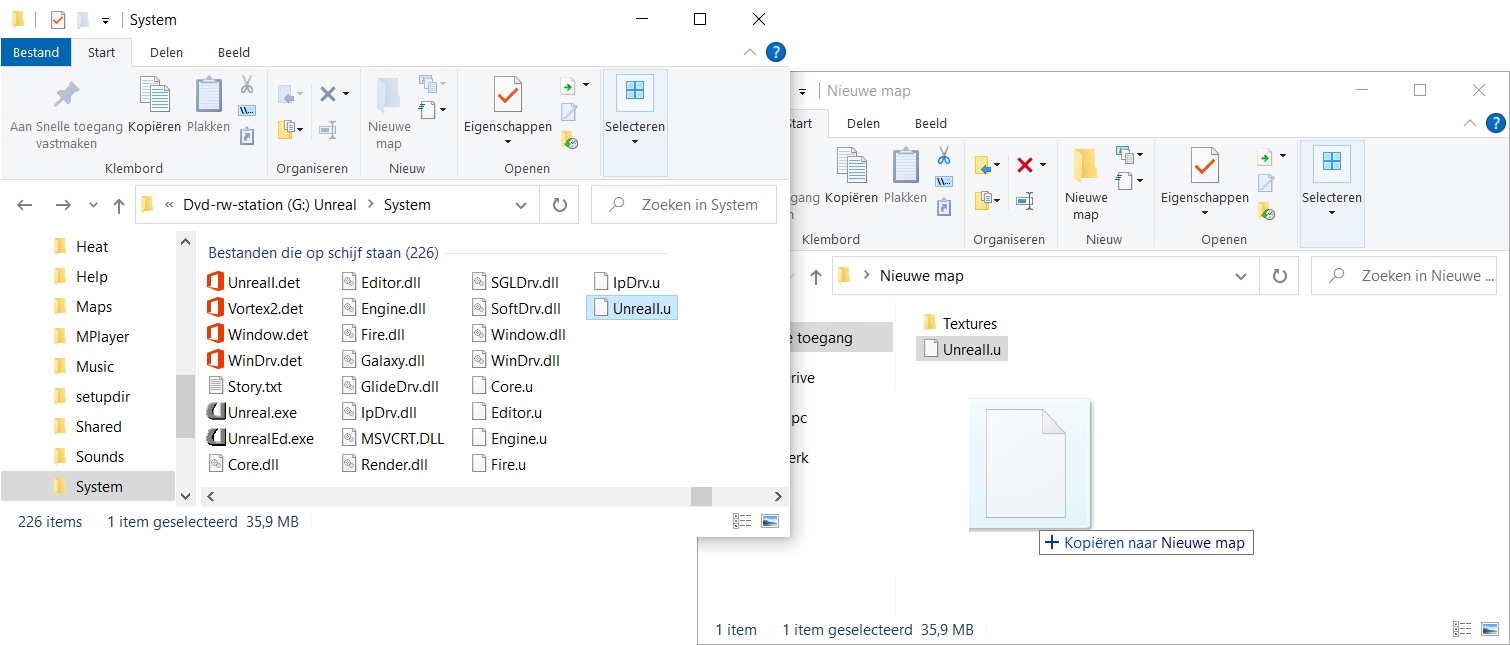
- For Unreal, the 3D models are stored as Meshes inside the UnrealI.u package that you can find in the Systems folder on the CD-ROM.
- And the easiest way to find the character Skin Textures is in the .utx files in the Textures folder on the CD-ROM.
NOTE: As you'll see, I'm using a physical
CD-ROM release of Unreal since I have it. If you got the game on
Steam of
GOG.com, you should find the
UnrealI.u file and the
Textures folder in the Unreal installation folder after you install the game. Although I didn't test it, the 3D model extraction method should be the same.
- I always like to make a special folder where I put all the files I'm working with so there's no way I can mess up the original files; so copy the UnrealI.u file and the Textures folder with all the .utx texture files to a new, empty folder.
NOTE 1: Even though it's called "Unreal Tournament Package Tool", it also works with the original Unreal game (and several others that use the same 3D engine 😉)
NOTE 2: The UT Package tool can be 'a bit buggy' especially on modern computers, but if it shuts down on you, just restart the tool and try again. 😊
- Open the UT Package Tool and then the first thing you should do is Go to File -> Options... and on the Options window, go to the Extracting tab and select a Base Directory where the UT Package Tool will save any exported files.
- Now choose File -> Open... and browse to the UnrealI.u package you copied to open it.
- The UT Package Tool will read the file data and create a (long!) list, which will show up on the left side of the screen.
- Browse in the long list for the character (or object) you want to extract. Make sure it's listed as a Mesh in the Class column.
- You can right-click a Mesh, and then choose View the Mesh to see a preview of the 3D model (this should work for most of the characters, but with some Meshes it will crash the UT Package Tool).
- When you find the 3D model you're looking for (I chose the Male3 Mesh), right-click the Mesh again but now choose Extract Mesh -> As 3DStudio (3DStudio .3ds files can be opened in many different 3D applications).
- The .3ds files will be extracted to the Base Directory you selected in the Options earlier.
NOTE: By default, UT Package Tool will extract All Frames that the Mesh holds In separate files and there can be *a lot* of them! Basically, each animation Frame will be a different pose and a separate .3ds file this way, and you can then look through each of the files to choose the pose you would like to make into a papercraft.
If you don't want to extract that many files however, you can also UN-check the All Frames checkbox in the 3DS Export Options window so that the Frame dropdown list becomes active to let you select one specific frame to extract instead.
● Exporting Unreal character Skin Textures (Unreal Tournament Package Tool)
- The easiest way to find the matching Skin Texture for the character Meshes is to look for the .utx file with the same name in the Textures folder;
- Choose File -> Open... again, but now browse to the .utx file with the same name of the Mesh you extracted (so in this example case Male3Skins.utx).
- The .utx texture file is a package with several different Texture variations and different team color Skins for the same Mesh (to make a papercraft model, you don't have to worry about the Palettes);
- Like before, you can preview the variations by right-clicking a Texture and then choosing View Texture and choosing Extract as Image -> First MipMap as BMP to extract them as an image file (the other MipMaps are just smaller versions of the first one; I like to use the BMP image format because it's easy to work with for me).
- The .bmp file will be extracted to the same Base Directory that you selected in the UT Package Tool's Options as the .3ds files that you extracted earlier.
● Exporting Unreal weapon Meshes and Textures (Unreal Tournament Package Tool)
- The weapon models are stored in separate Meshes that you can extract from the UnrealI.u file by right-clicking them in the list and choosing Extract Mesh -> As 3DStudio the same way as the character Meshes.
NOTE: the weapon Mesh extraction is also 'quite buggy'...! You will find several mentions of the same weapon with small differences as a Mesh in the list: some of them will crash the UT Package Tool without warning when you try to extract the Mesh, so if that happens try again with one of the other listings for the weapon.
Ironically, if you get an Exception extracting error message about an Invalid pointer operation, the weapon Mesh should be extracted succesfully to the Base Directory you set up earlier in the Options. 😋
- After succesfully extracting a weapon Mesh, scroll down to the Skins listing in the same UnrealI.u package to see a long list of Textures.
- Right-click the matching Texture for your Weapon Mesh and choose Extract as Image -> First MipMap as BMP.
NOTE: You might notice that you could have gotten the Dante Skin Texture from this list in the UnrealI.u package as well; you won't really be able to tell from this list whether it suits the Male 3 Mesh however, which is why I find it easier to get the Skin Texture from the separate .utx files where you can easily tell so.
And that's really all there is to it! 😀 This time, you really need
only one tool (albeit a bit buggy one sometimes 😉) and you don't even have to install the game if you have the CD-ROM version to extract the 3D models and textures from the game and you're ready to use it as a base to make a 3D model that you can unfold with
Pepakura Designer for your papercraft!
- ...stay tuned while I do that! 😉
Tool used:
Addendum 1: Who is Prisoner 849?
When you start Unreal, you can choose from several different male and female character models as your Digital Representation. I don't know if the Prisoner 849 character was ever officially called out by name, but most sites speculate that the Male 3 Mesh with the Dante Skin counts as the default male character, and the Female 1 Mesh with the Gina Skin as the default female one.
Addendum 2: Weapon Meshes and Textures in UnrealI.u
- ASMD: ASMD3 (Mesh) + ASMD1 (Texture)
- AutoMag: AutoMagL / AutoMagR (Mesh) + AutoMa1 (Texture)
- GESBioRifle: Brifle3 (Mesh) + JBRifle1 (Texture)
- Dispersion Pistol: DPistolPick (Mesh) + Dpistol1 (Texture)
- 8-Ball Launcher: EightPick (Mesh) + JEightB1 (Texture)
- Flak Cannon: Flak3rd (Mesh) + Jflak1 (Texture)
- MiniGun: minipick (Mesh) + minigun1 (Texture)
- RazorJack: Razor3rd (Mesh) + JRazor1 (Texture)
- Assault Rifle: didn't find (Mesh) + JRifle1 (Texture)
- Stinger: StingerPickup (Mesh) + Sting1 (Texture)
(Note: if you get an Exception extracting error message about an Invalid pointer operation, the extraction should actually have been succesful; if the UT Package Tool crashes, try another Mesh listing for the weapon)